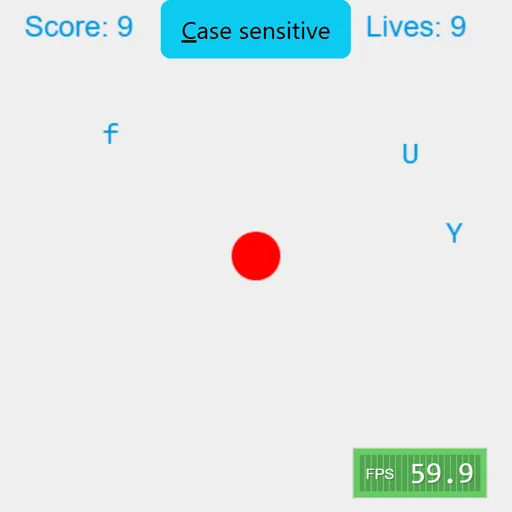
Typer Defense is a fast typing game where you protect a red core at the center of your window. Lone letters float in from both sides and close in on it. Hit the right key and that letter pops into a spray of colored dots. Any letter that touches the core costs one life. The original, by Berk Erol, is an open-source project named Typer.
How Play Works
Each letter enters at a random height and travels at a speed of its own. Every correct key removes a letter and scores a point. Pressing a key with no match deducts a point, so random mashing does not help.
Ten lives sit in the upper right. After every hit, all letters vanish and the game carries on. Once your lives run out, the session is over. Speed does not ramp up, so the real challenge is staying calm and accurate for a long time.
How to Control Typer Defense
| To do this | On a keyboard | With a mouse |
|---|---|---|
| Blast a letter | Hit the letter key that matches | — |
| Enter a capital letter | Shift + that letter | — |
| Pause or continue | Press Esc | — |
| Toggle case sensitivity | — | Click the "Case sensitive" button |
Case Sensitive or Not
By default, case matters. Uppercase targets need Shift held down, while lowercase ones need it released. A button along the top turns that rule off. After that, only small letters show up and Shift does not matter. This easier mode is a good place to learn the keys.
Typing Tips
- Deal with the fastest letter near the core first, not just the closest one.
- When two copies of a letter are on screen, a press clears the one that arrived last. Press again for the older one.
- Avoid guessing, since misses lower your score.
- Press Esc to freeze the action during a heavy rush.
- Keep your hands on the home row so every key is a short reach.
Who Should Try It
It is a good warm-up before writing and a fun way for kids to learn where the letters are. The game resizes to fit your window and keeps the core centered. A small frame meter sits in the bottom corner. For other casual picks, browse the casual games, or try Math Sprint for quick sums instead of letters.
Last played and checked by SZ Games: