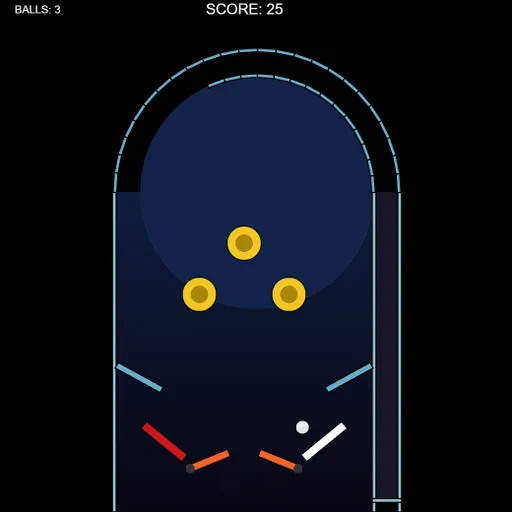
Pinball is a tidy single-table game where the ball moves by real physics. It rolls, spins and rebounds in ways that feel right, so careful flipper timing pays off. Frank Force made it for his open-source LittleJS Arcade, and the Box2D engine handles the ball and flippers. The table is small and easy to read, which makes it a good pick when you want a quick game.
Inside the Table
At the top sits a rounded dome. Below it, three yellow pop bumpers form a triangle. Two angled slingshots guard the space just above the flippers, and a narrow launch lane runs up the right side. Side wedges and the dome do not score; they only steer the ball back into play.
Getting the Ball Moving
Every ball starts in the right-hand lane. When it is ready, the lane lights up and a gauge appears. Hold the launch control to charge it, watching the color shift from green toward red, then let go. The ball races up the lane, curls over the dome along the outer rail and falls into the field. A bigger charge means more speed around the top.
How Points Add Up
Each pop bumper pays 100 points per touch and fires the ball away with force. When the ball gets caught among all three, the points can pile up quickly. Each slingshot pays 25 and pushes the ball back toward the center. Keep the ball alive as long as you can, because a drain costs you one of your three balls.
How to Control Pinball
| To do this | On a keyboard | With a mouse | On a touchscreen |
|---|---|---|---|
| Flip the left flipper | Left arrow, A or Z | Press the left button | Press the left on-screen button |
| Flip the right flipper | Right arrow, D or / | Press the right button | Press the right on-screen button |
| Power up and fire the ball | Hold down Space, then let go | Hold down either button, then let go | Hold down either button, then let go |
| Begin a new game once the last ball drains | Press Space or Enter | — | — |
| Pause play | Press Esc | — | — |
Keeping the Ball in Play
- Flip one side at a time. Raising both flippers leaves the gap wide open. Move only the flipper the ball is heading to.
- Trap and aim. Hold a flipper up so the ball rolls onto it and stops. Then release and flip for a cleaner shot.
- Send it to the triangle. Shots that reach the bumper area under the dome often bounce around for several hits.
- Try a softer launch. A slightly smaller charge can drop the ball into play more gently.
- Expect wall bounces. Balls sliding down the sides get nudged back inward, so be ready near the middle.
Playing on Any Device
On a phone or tablet, two buttons show up at the bottom corners and work as flippers and the plunger. Keyboard, mouse and gamepad all work too. Want another physics game after this? Try Pegball, or look through more arcade games on SZ Games.
Last played and checked by SZ Games: