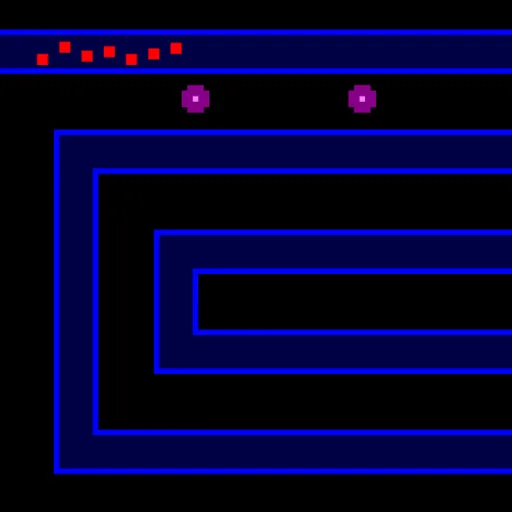
Canvas Tower Defense is a neon strategy game where the waves never stop. Red squares follow a glowing blue road across a black field, and you stop them with turrets placed beside it. Teddy Cross released the open-source original as Canvas TD. With four turret types, three maps and ten upgrade levels per stat, there is plenty to experiment with.
The Aim
Survive as long as you can and set a better score than last time. Every creep that reaches the end of the road costs a life. You have ten. When they are gone, the run ends and your score is saved if it makes your top five for that map.
Choosing a Map
- Loopy spirals inward toward the center.
- Backtrack folds back on itself.
- Dash is one long straight line.
The shape changes everything. Winding roads give a single turret many chances to hit, while a straight path needs more raw power.
Building and Upgrading
Turrets go on empty black ground. They cannot sit on the road or overlap. Pick a type from the bottom bar, then click where it should go. Select a placed turret to upgrade its damage, fire rate or range. Upgrade costs rise each level, from $25 up to $1,000.
A wave of ten creeps arrives on a timer. The red square in the bottom right fades as the next wave nears, and you can click it to send the wave early. Creep health climbs with every wave, so a setup that feels safe now will fall behind.
How to Control Canvas Tower Defense
| To do this | On a keyboard | With a mouse | On a touchscreen |
|---|---|---|---|
| Place a Laser, Missile, Tazer or Mortar | Press 1, 2, 3 or 4, then click on the map | Pick a turret in the bottom bar, then click a free spot | Tap a turret, then tap a free spot |
| Choose a placed turret | — | Click on it | Tap on it |
| Boost the selected turret's damage, rate or range | Press 1, 2 or 3 | Hit Damage, Rate or Range in the bottom bar | Tap those same buttons |
| Relocate the selected turret ($90) | Press 4 | Hit Move, then click a different spot | — |
| Sell off the selected turret | Shift + 8 (the * key) | Hit Sell | — |
| Call in the next wave immediately | Press Enter | Click the red square in the bottom right | — |
| Turn fast forward on or off | Press = | Click the blue square below the red one | — |
| Deselect, cancel or pause | Press Esc | Hit Pause | — |
The Four Turrets
- Laser: cheap at $15 and fast, it fires at the lead creep.
- Missile: heavier shots that splash once maxed.
- Tazer: slows the fastest creep in range.
- Mortar: lobs blasts that can set creeps burning once maxed.
Defense Tips
- Start with two lasers. They are the only turret you can buy twice at the beginning.
- Use the curves. A turret inside a bend can cover several parts of the road.
- Combine slow and damage. A tazer holds creeps under your strongest guns longer.
- Upgrade instead of spreading thin. One strong turret often beats several weak ones.
- Send waves early when safe. More kills mean more cash and a higher score.
- Rarely sell. You only get 70 percent back, and it cuts your score.
Device Notes
Mouse and keyboard give you full control, including shortcuts and fast forward. Touch works for building and upgrading. If you want more planning games, see the strategy games on SZ Games.
Last played and checked by SZ Games: