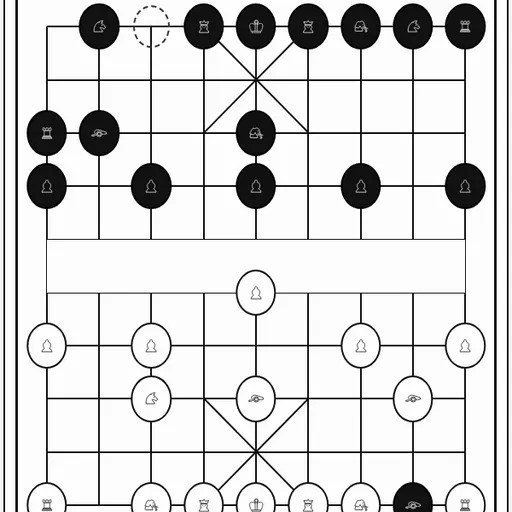
Xiangqi is the chess of China. Instead of sitting in squares, pieces rest on line crossings. A river cuts the 9x10 board in half, both Generals are kept in a tiny palace, and a cannon takes pieces by leaping over a single screen. You will find this edition in the open-source PaperGames set by Christopher Müller. Take red or black versus a three-level computer, or pass the device to a friend.
The Goal
Red opens the game. A turn means moving a single piece, and you take an enemy by moving onto it. Victory comes from checkmate, or from a position where the other side has nothing legal to play.
How Each Piece Moves
- General: one point straight, inside the palace.
- Advisors: one point diagonally, inside the palace.
- Elephants: two points diagonally, and never across the river.
- Horses: one point straight then one diagonally, unless the first point is blocked.
- Chariots: slide as far as they like along a line.
- Cannons: travel the same way, yet need to hop one piece, friend or foe, to take something.
- Soldiers: advance one point. Once over the river, a sideways step is allowed as well.
Generals must not stare at each other down an empty file, so moves that would cause that are blocked.
How to Control Xiangqi
| To do this | On a keyboard | With a mouse | On a touchscreen |
|---|---|---|---|
| Move a piece | Tab into the board, use arrow keys to reach a point, press Enter on your piece and once more on its destination | Click your piece, then click the point you want it on | Tap your piece, then tap its destination point |
| Toggle character or symbol pieces | — | Click "Switch to symbols" or "Switch to characters" | Tap "Switch to symbols" or "Switch to characters" |
| Show or hide the list of moves | — | Click "Moves" | Tap "Moves" |
| Set your side and opponent | — | Select red or black and a level, then click "New game" | Select red or black and a level, then tap "New game" |
| Take back or concede | — | Click "Undo" or "Resign" | Tap "Undo" or "Resign" |
Opening Ideas
- Move a cannon to the center file early to pressure the enemy General.
- Bring horses out before the board fills up and blocks them.
- Get chariots onto open files, where they can reach both sides fast.
- Any piece sitting between a cannon and its target acts as a screen, yours included.
- The facing-Generals rule lets you freeze an enemy piece on the middle file.
Features Worth Knowing
A move record in coordinate form runs beside the board, with Undo and Resign close by. Switching from characters to symbol art takes one button, a big help while you learn. If you also play the western game, try Chess vs Computer, or try Shogi from Japan.
Last played and checked by SZ Games: