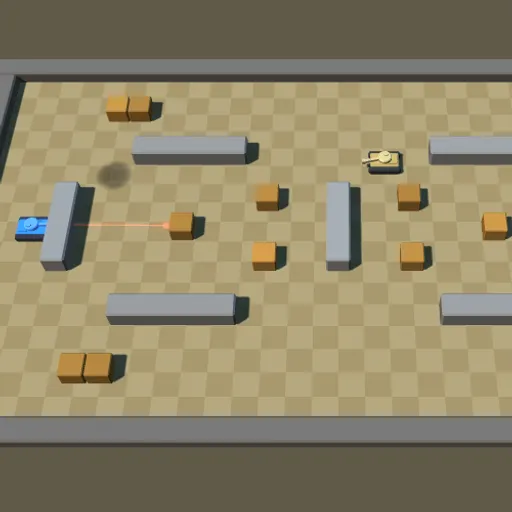
Tank Ricochet is a top-down tank battle in a small 3D arena. Stone walls and wooden crates fill the field. You drive the blue tank on the left, and enemy tanks wait on the right. Your shells can bounce off stone once, so a clever angle often beats a direct shot. A red aiming line shows where your next shell will travel. Frank Force made the game with his LittleJS engine.
Waves and Arenas
Each wave puts you in one of four arena layouts with a group of enemy tanks. Destroy every enemy to clear the wave and earn a bonus worth 100 points times the wave number. The next wave brings a new layout and more tanks, up to eight at a time.
Your hull turns toward the direction you press and rolls once it faces that way. The turret aims on its own, so you can drive one way and shoot another.
How to Control Tank Ricochet
| To do this | On a keyboard | With a mouse | On a touchscreen |
|---|---|---|---|
| Move the tank | W A S D or arrow keys | — | The left on-screen stick |
| Point the turret | — | Move your pointer | The right on-screen stick |
| Launch a shell | Press Space | Left click (keep held to fire continuously) | Push the right stick |
| Pause the game | Press Esc | The menu icon in the top right corner | The menu icon in the top right corner |
You lose a life each time you are hit, and the run ends when all lives are gone.
Know Your Enemies
- Sentries never move.
- Scouts keep their distance.
- Hunters appear from wave 3 and fire faster.
- Heavy tanks arrive from wave 5 and take three hits.
Mines show up from wave 2, and explosive barrels from wave 3. Drive over a mine or shoot either one and the blast damages every tank nearby, including yours. One blast can set off others in a chain.
Battle Plan
- Check the aiming line before every bank shot.
- Hide beside a stone block and bounce shots around its corner.
- Fire into a barrel or mine when enemies crowd near it.
- Do not shoot a wall at close range. The shell can bounce right back.
- Take out sentries early for easy points.
- Break crates that block your lanes, but keep the ones that shield you.
Settings
An options menu lets you switch shadows, glow and screen shake on or off. That helps on slower devices or if screen shake bothers you. For more shooting and dodging, see the action games list or try City Shield.
Last played and checked by SZ Games: