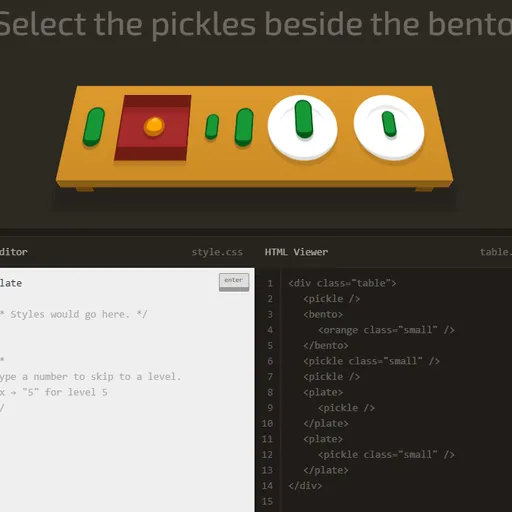
CSS Diner turns CSS selectors into a meal you serve one order at a time. Each level sets a table with plates, bento boxes, apples, oranges and pickles, then gives a short request such as “Select the small apples.” You write the selector that would target just those items. The table is built from real HTML, so your answer is tested on real elements.
What You Learn Here
Selectors are how a stylesheet points at parts of a page. They can look simple, but the details trip up many beginners. This game gives you a visual target for each rule, so you see right away which items your selector grabs.
Each level focuses on one idea. A help panel on the right names it, shows the syntax and gives examples you can adapt.
Serving an Order
Items you need to pick bounce on the table. Under the table, the HTML Viewer shows the markup for everything on it. Type your answer in the CSS Editor and press Enter.
If your selector matches exactly the bouncing items, they fly off the table. The level gets a checkmark and the next one opens. If it grabs too many, too few or none, the editor shakes so you can try again. Your answer does not need to match the example. Any selector that picks the right set counts.
How to Control CSS Diner
| To do this | On a keyboard | With a mouse |
|---|---|---|
| Enter a selector | Type into the CSS Editor box | — |
| Submit your answer | Press Enter | Hit the "enter" button |
| Go to a specific level | Type its level number, then press Enter | Open the top-right menu and pick a level |
| View an item's HTML | — | Rest the pointer on a table item or an HTML Viewer line |
| Step to the previous or next level | — | Use the arrows next to the level title |
| Dismiss the level menu | Press Esc | — |
How the 32 Levels Build Up
- Basics: element types, IDs and classes.
- Combining: descendants, commas to group rules, and the
*universal selector. - Relationships: the
+and~sibling combinators and the>child combinator. - Pseudo-classes:
:first-child,:nth-child,:nth-of-type,:only-of-type,:emptyand:not(). - Attributes: plain attribute matches plus
^=,$=and*=.
Finishing level 32 completes the game.
Helpful Habits
- Read the markup, not just the order. The HTML Viewer shows the real tags and classes you can use.
- Hover to connect the two views. Pointing at a table item lights up its code line, and pointing at a line lights up the item.
- Remember nth counts from 1.
plate:nth-child(3)is the third child. - Watch spaces.
plate applefinds apples anywhere inside a plate, whileplate > appleonly finds ones directly on it.
Your current level and solved levels are saved in your browser. Type a number and press Enter to jump straight to that level.
Best Setup
CSS Diner works best on a computer with a mouse and keyboard. The side-by-side layout needs a wide screen, and the hover tooltips need a pointer. You can type on a phone, but the view is cramped. Once selectors click, try CSS Grid Carrot Patch to practice layout.
Last played and checked by SZ Games: