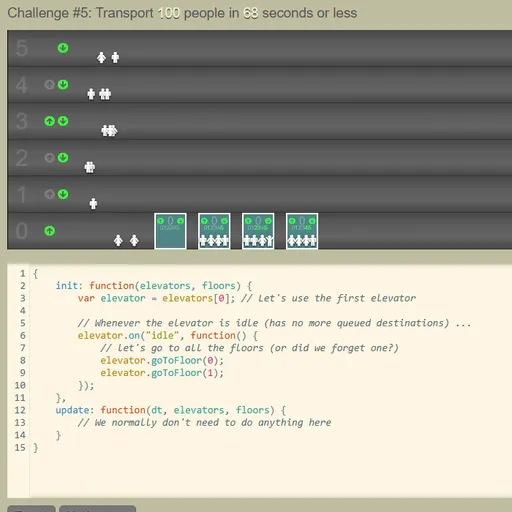
Elevator Saga is a coding puzzle where you run a building’s elevators with JavaScript. You never tap a call button yourself. You write the rules, press Apply and watch small riders step in and out as your code decides where each car goes. Every challenge has a goal, and clumsy logic leaves people stuck in the lobby.
The Puzzle in Plain Terms
The upper half of the screen is the building. Riders appear on floors and press up or down. The lower half is a code editor with a starter program. That program works, but only barely. Your task is to make it smarter.
The editor has line numbers, syntax colors and auto-closing brackets. Your code is saved in the browser about a second after you stop typing, and the Save button stores it at once.
Writing Your Controller
Your program is an object with two functions, init and update. Most of the work lives in init, where you hook up event listeners.
For each elevator, you can listen for events like idle, floor_button_pressed and stopped_at_floor. For each floor, there are up_button_pressed and down_button_pressed. Inside those handlers you call goToFloor(), read loadFactor() to see how full a car is, or change the destinationQueue directly.
The game reads your code only when you click Apply or restart the challenge.
How to Control Elevator Saga
| To do this | On a keyboard | With a mouse |
|---|---|---|
| Write and edit your elevator program | Type into the code editor (Tab adds four spaces) | Click into the editor to set the cursor |
| Run your code from the beginning of the challenge | — | Hit "Apply" |
| Start, pause or restart the simulation | — | Use the Start / Pause / Restart button |
| Adjust simulation speed | — | Click the minus or plus icon beside the speed number |
| Move on to the next challenge after winning | — | Hit "Next challenge" |
| Save, reset, or restore code from before a reset | — | Pick "Save", "Reset" or "Undo reset" |
How the Challenges Grow
There are 18 graded challenges. The first has one car and three floors, and only needs a small fix. Later ones add more cars with different sizes and climb as high as 21 floors. After the last graded stage, a 19th stage runs as an endless demo with no goal.
A panel shows live stats: riders moved, riders per second, average and longest wait, and total moves. Check them to see where your code falls short.
Better Elevator Logic
- Go where riders ask. The starter code shuttles between floors 0 and 1 only. Sending a car to each pressed floor is a big first step.
- Respond to hall calls. Use the floor button events so idle cars head toward people who are waiting.
- Pass by when full. If
loadFactor()is high, skip pickups. A packed car cannot help anyone. - Match the goal. When moves are limited, wait for several riders instead of making many short trips.
- Test at high speed. Speed up to check a strategy, then slow down to see exactly where it breaks.
Who It Is For
This game suits people who know some JavaScript or want a fun reason to practice it. Beginners can start small, and seasoned coders can chase very efficient solutions. It needs a keyboard and a wide screen, so use a laptop or desktop. If you like learning code through play, try CSS Diner as well.
Last played and checked by SZ Games: