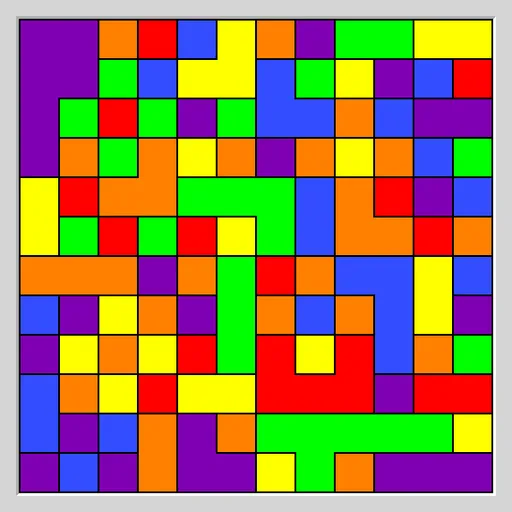
Flood Fill Puzzle is a neat little logic game about spreading paint. A grid starts covered in random squares of six colors. The top left corner owns a patch, and every move repaints that whole patch in a color you choose. Neighbors of that color then join in, so the patch grows. This is Flood from Simon Tatham’s Portable Puzzle Collection.
The Goal
You want the whole grid to be one color. The catch is the move limit. Each grid comes with a set number of moves, and you need to finish at or under it.
Making a Move
Click or tap any square on the grid. The corner patch takes that square’s color. Every square of that color touching the patch through a side now becomes part of it. Corner-only touches do not count.
Picking the color your patch already has does nothing and costs no move. Only a real color change adds to the count.
The status bar under the grid shows progress, such as “3 / 25 moves”. Fill the board within the limit and it reads COMPLETED. Go over and it reads FAILED, though you can still keep going or undo.
How to Control Flood Fill Puzzle
| To do this | On a keyboard | With a mouse | On a touchscreen |
|---|---|---|---|
| Flood the corner region with a color | Move the cursor with Arrow keys, then press Enter | Left-click a square of that color | Tap a square of that color |
| Undo or redo a move | Press U / R | Use the Undo move / Redo move buttons | Use the Undo move / Redo move buttons |
| Generate a new grid | Press N | Use the New game button | Use the New game button |
| Adjust size, colors or difficulty | — | Open the Type menu | Open the Type menu |
Board Types
The default grid is 12x12 on Easy. The Type menu also offers Medium and Hard, a bigger 16x16 board and versions with three or four colors. In Custom, you choose width, height, color count and spare moves.
The game sets each limit by solving the grid itself and then adding spare moves. On Hard there are none, so you must match the built-in solver. That solver is not always perfect, so you can sometimes beat it.
Planning Your Spread
- Count what you gain. Choose the color that adds the most squares, not just the closest one.
- Reach for the far corner. A long arm toward the bottom right opens many new edges at once.
- Wipe out a color. If all of one color touches your patch, take it all. You will never need it again.
- Grab lone squares on the way. A single leftover square can cost a whole move at the end.
- Compare with Undo. Try two orders and keep the one that leaves fewer colors.
Why It Is Worth a Try
Games are quick, and the rules take seconds to learn. Yet each board rewards a little planning. It works with a mouse, with touch, or with the keyboard cursor and Enter. Unlimited undo and redo make it easy to experiment. For a different color challenge, see Color Pour Sort.
Last played and checked by SZ Games: