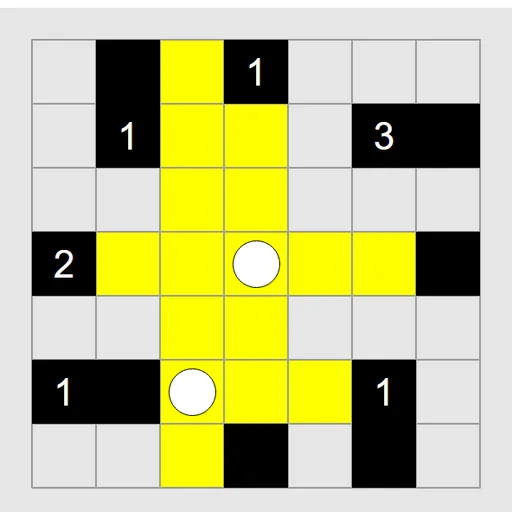
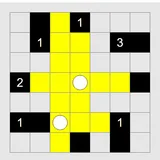
Light Up Lamp Puzzle is a grid of white cells and black walls, and you need to light every white cell. You do it by placing bulbs. A bulb shines along its row and column until a wall or the edge stops the beam. Some walls carry numbers that set how many bulbs must sit beside them. James Harvey wrote this puzzle for Simon Tatham’s Portable Puzzle Collection.
Three Rules to Satisfy
The board is solved when all three of these are true at once:
- Every white cell is lit, either by a bulb on it or by a beam passing through.
- No bulb is in the beam of another bulb. Two bulbs may not face each other along an open line.
- Each numbered wall has exactly that many bulbs in the cells directly next to it, not counting diagonals.
Walls without numbers only block light. Any number of bulbs may touch them. When you finish, the grid flashes.
Placing Bulbs and Marks
Click or tap a white cell to drop a bulb, and again to remove it. Lit cells turn yellow, so you can watch the light spread. If you are sure a cell can’t hold a bulb, mark it with a right-click or a long press.
Red is the warning color. A bulb turns red if another bulb lights it. A number turns red if it has too many bulbs, or if too few open cells remain around it to reach its count.
How to Control Light Up Lamp Puzzle
| To do this | On a keyboard | With a mouse | On a touchscreen |
|---|---|---|---|
| Add or remove a bulb | Move with Arrow keys, then press Enter | Left-click a white square | Tap a white square |
| Flag a square where no bulb can go | Space or I | Right-click a white square | Long-press a white square |
| New puzzle, undo, redo | N, U, R | Use the menu buttons above the grid | Use the menu buttons above the grid |
Picking a Board
Start with a 7x7 easy grid to learn how clues work. Then move to tricky, and later to the 10x10 and 14x14 sizes. Custom boards let you change the share of black squares and the symmetry of the walls too.
Ways to Reason It Out
- Handle the 4s first. A 4 needs bulbs on all four sides, so place them right away.
- Mark every neighbor of a 0. None of them can take a bulb.
- Count open sides. A 3 on the board edge has only three neighbors, so all three get bulbs. A 2 in a corner works the same way.
- Find lonely cells. If a dark cell can only be lit from one spot, a bulb must go there.
- Use marks to narrow choices. Each mark cuts down where a beam can come from.
- Fix red right away. A clash is easiest to undo the moment it appears.
Undo and redo have no limit, and the Solve option shows the answer if you want to check your work.
Who Will Enjoy It
If you like logic grids where every step can be proven, this one fits well. It pairs nicely with Logic Mines, which also rewards careful counting. Both run in the browser with no sign-up.
Touch and Keyboard Notes
On a phone, a tap places a bulb and a half-second hold places a mark. On a keyboard, arrow keys move a cursor, Enter places a bulb and Space marks a cell. N, U and R start a new game, undo and redo.
Last played and checked by SZ Games: