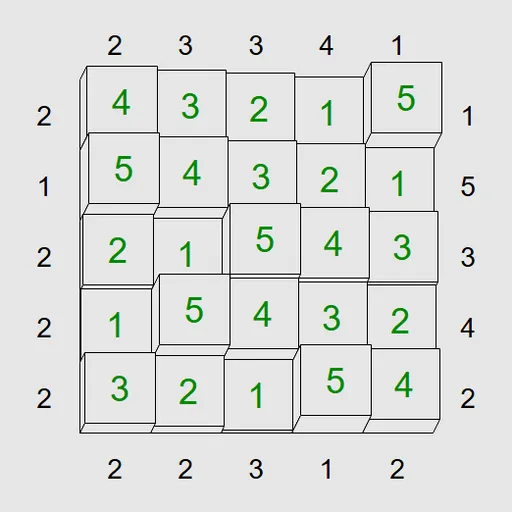
Skyscraper Sightlines turns a number grid into a tiny city. Every square holds one tower, and the clues around the outside say how many rooftops you would see standing at that spot. Your job is to place every tower so all the clues come true. This is the Towers puzzle from Simon Tatham’s Portable Puzzle Collection, shown in a clean 3D style.
Two Rules to Follow
First, each row and each column must contain every height exactly once. On a 5x5 board, that means the numbers 1 to 5 in every line, with no repeats.
Second, the border clues must match. Look along a row or column from the clue’s side. A tower counts as visible only if it is taller than all the towers in front of it. Take the row 3, 1, 5, 2, 4. From the left you see 3 and 5, so the clue is 2. From the right you see 4 and 5, also 2.
Filling the Grid
Select a square and type a height to build a tower there. When you are not sure, use pencil marks to jot down the heights that could fit, then erase them as you rule them out. Press M to fill every empty square with all possible marks at once. Clicking a clue you have finished with greys it out.
Errors such as a repeated height show in red. When every tower is right, the grid flashes.
How to Control Skyscraper Sightlines
| To do this | On a keyboard | With a mouse | On a touchscreen |
|---|---|---|---|
| Place a building | Choose a square with the arrow keys, then type the height | Click a square, then type a digit | Tap a square, then tap a digit button |
| Toggle a pencil mark | Enter puts the cursor in pencil mode, then type a digit | Right-click a square, then type a digit | Set Tap to Pencil mark (or press and hold a square), then tap a digit |
| Empty a square | Space, Backspace or 0 | — | Tap the square, then Clear |
| Pencil every possible digit into all empty squares | Press M | — | — |
| Dim a clue you are done with | — | Click that clue | Tap that clue |
| Start new, undo or redo | N, U, R | Use the menu buttons above the grid | Use the menu buttons above the grid |
Clues That Crack Puzzles Open
- A 1 means the tallest tower is right there. Nothing can hide behind it, so fill it in first.
- A clue equal to the grid size solves a whole line. The heights must rise one step at a time from that side.
- Low clues limit the first square. Next to a clue of c, the first tower can be at most N minus c plus 1, where N is the grid size.
- Pair opposite clues. Seeing a row from both ends often narrows where the tallest tower can go.
- Grey out used clues. It keeps your eye on what still matters.
Sizes and Difficulty
The Type menu has presets from 4x4 to 6x6 across four levels, from Easy up to Unreasonable. A Custom option allows grids from 3x3 to 9x9. On phones, a bar under the grid gives you digit buttons and a switch for pencil mode. For more number logic, try Math Cage Grid or the other puzzle games on SZ Games.
Last played and checked by SZ Games: