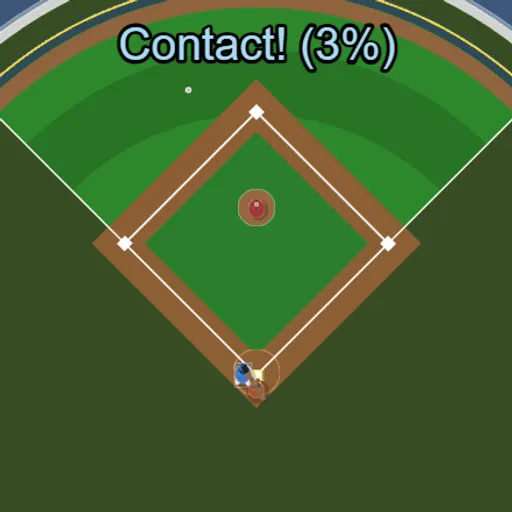
Backyard Slugger is a one-button baseball game about the swing and nothing else. The camera looks straight down on a small ballpark. A pitcher throws, you swing, and the physics decide where the ball goes. There is no inning count and no game over, just steady pitches and the chance to hit one more over the wall. Frank Force built it with the LittleJS engine and Box2D.
What You Are Trying to Do
Clear the outfield fence between the two white foul lines. That is a home run. Anything that crosses the fence outside those lines is foul and does not count.
Reading the Pitch
Press Play and the first throw comes a moment later. Each pitch varies a little in speed and location. About two out of three head for the yellow strike zone over the plate. The rest sail high, low or wide.
Swing with Space, a click or a tap. The bat takes roughly a quarter of a second to sweep across the zone. If you connect, a message pops up with a contact percentage. The ball leaves at a right angle to the bat, so the moment you swing also sets the direction.
Balls, Strikes and the Count
Miss a swing and it is a swinging strike. Take a pitch in the zone and it is a called strike. Let a pitch outside the zone pass and it is a ball. Three strikes make an out, four balls make a walk, and either one resets the count. A hit resets it too.
How to Control Backyard Slugger
| To do this | On a keyboard | With a mouse | On a touchscreen |
|---|---|---|---|
| Take a swing | Press Space (gamepad A) | Left click to swing | Tap anywhere on the screen |
| Ask for the next pitch immediately | Press Enter | — | — |
| Clear your session stats | Press R | — | — |
| Pause, restart or leave | Press Esc | Hit the menu icon in the top right | Tap the menu icon in the top right |
Swing Advice
- Swing before the ball arrives. The bat needs a moment to come around, so start a bit early.
- Take bad pitches. Holding still on a wide throw earns you a ball.
- Aim for the end of the bat. Contact near the tip and on the center line gives the best rating and the fastest ball.
- Correct after fouls. Left foul means you were early. Right foul means you were late.
- Set your own pace. Press Enter to call the next pitch and skip the wait.
Stats and Screens
Hits, perfect hits, home runs and your longest hit stay on screen for the session. Press R to wipe them and start fresh. The view is wide, so on a phone turn it sideways or the score and outfield get cut off. Looking for more ball games? Free Throw Frenzy is another short timing challenge in our sports games.
Last played and checked by SZ Games: