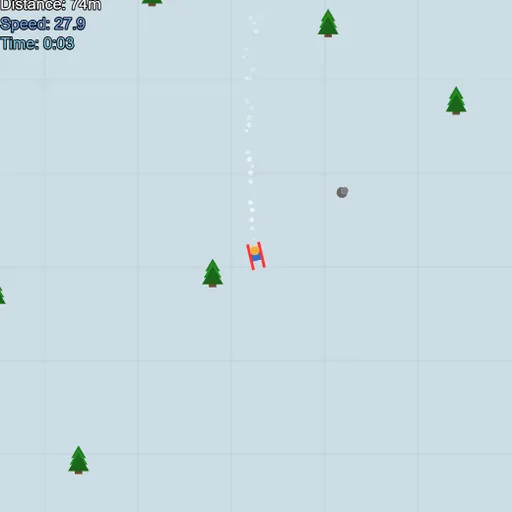
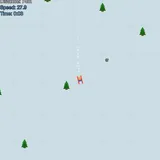
Downhill Ski is a simple, smooth skiing game where the hill never runs out. You see your skier from above and steer by moving the mouse. Pine trees and gray rocks dot the snow, and one hit ends the run. The aim is to travel as far as you can. The game is part of Frank Force’s open-source LittleJS Arcade.
The Run in Short
Press PLAY to drop in at the top. Hold the pointer below the skier, and the skier turns to face it. You can only face downhill, anywhere from hard left to hard right.
Speed is all about direction. Point straight down and you pick up pace. Turn across the hill and you slow fast. A faint grid on the snow helps you feel how quickly you are moving.
The top-left display tracks distance in meters, your speed and the time. After a crash, you see a short summary of how far and how long you went.
What You Will Meet on the Slope
The hill is built as you ski, so every run is different. About half of the obstacles are trees and about a quarter are rocks. Both end your run on contact, but their hitboxes are a bit smaller than the drawings, so close calls often pass.
Not everything is a threat. Snow bumps toss you into a small hop. Rare ramps with rainbow stripes launch you high and far. You can also click to jump at any time.
Once you are in the air, you cannot steer. The skier keeps the heading and speed it had at take-off.
How to Control Downhill Ski
| To do this | On a keyboard | With a mouse | On a touchscreen |
|---|---|---|---|
| Turn the skier | — | Move the pointer and the skier swings to face it | Press and slide a finger |
| Leap | — | Left click to jump | Tap the screen |
| Try again after a crash | Press Space, Enter or R | — | — |
| Pause or start over | Press Esc | Use the menu button in the top corner | Use the menu button in the top corner |
Skiing Further
- Turn to brake. Cut across the slope before a busy patch, then point down again once you see a clear lane.
- Steer from a distance. Keeping the pointer well ahead of the skier gives gentler, steadier turns.
- Jump a little early. Hang time is fixed, so leave the snow just before the obstacle, not on top of it.
- Chase ramps. A ramp jump carries you over everything for a stretch.
- Look at both edges. Obstacles come from the sides too, and high speed gives you less time to react.
Devices and Feel
The game plays best with a mouse, since the skier tracks the pointer closely. Space, Enter or R restarts after a crash, and Esc pauses. A gamepad is supported too. Touch screens work, but tapping to steer also makes you jump, so control is looser.
Short runs make it a good game for a quick break. For more ball and field action, see the sports games page or try Coding Golf.
Last played and checked by SZ Games: