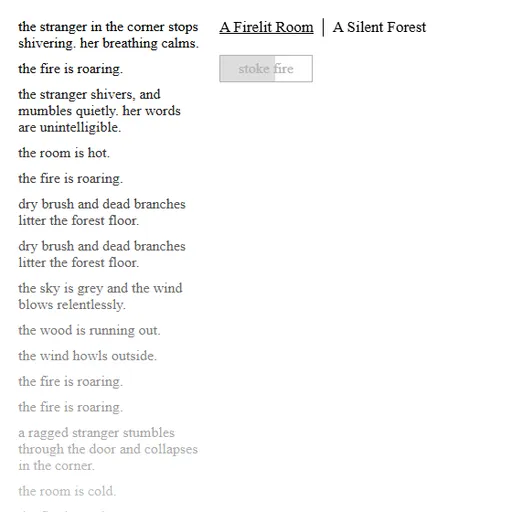
A Dark Room opens on a blank screen with one button that says to light the fire. That is all you get at first. Each click reveals a little more, and over time a quiet text game turns into a story about survival, trade and a long trip into the unknown. You never see a picture. Short lines of text do all the work.
From One Fire to a Village
The fire needs five wood to start and one more each time you stoke it. Let it fade and the log on the left notes the cold. A worn-out stranger soon walks in. Keep the room warm and she gets better, and then she starts offering to build.
Wood runs short, so a forest path opens. Collect wood there and turn it into traps, a cart and huts. Traps bring in fur, meat, scales and teeth. Huts attract villagers, and you assign each one a job, such as gatherer, hunter or tanner. Many jobs convert one resource into another, so balancing them is a big part of the game.
Heading Out Into the Wild
Once the trading post can sell you a compass, the Dusty Path appears. Pack food, water and gear, then step onto the world map. Every step drains supplies, so plan routes past outposts where you can refill water. Fights happen along the way, and the creatures grow tougher the farther you go.
Clearing a mine lets villagers work it as miners. Near the end, the game leaves the map behind, and how well you stocked up shapes your final result.
How to Control A Dark Room
| To do this | On a keyboard | With a mouse |
|---|---|---|
| Perform an action (light fire, gather wood, build, trade) | — | Click its button |
| Move between locations | Press Left / Right arrows or A / D | Click one of the location names along the top |
| Travel across the world map | Use the Arrow keys or W A S D | Click the side of the map you want to head toward |
| Pilot the ship while escaping | Use the Arrow keys or W A S D | — |
| Toggle double speed, dark theme, save code or restart | — | Pick "hyper.", "lights off.", "save." or "restart." in the bottom corner |
Ways to Keep Your Run Alive
- Never let the early fire die. The builder only heals while the room is warm.
- Hold back trap goods. The compass costs 400 fur, 20 scales and 10 teeth, so do not trade all of it away.
- Watch income numbers. Charcutiers use wood and meat, and tanners eat fur. If a total drops, add gatherers or hunters.
- Carry extra water. You drink every step but eat every second step.
- Wear iron armor for long trips. The game warns you once you are eight or more steps out without it.
- Speed up slow parts. Hyper mode halves most waits.
Why It Works on a Quiet Evening
The game rewards patience more than quick reflexes. You can leave it running, come back, and find your stores have grown. Random events, like traders or beast attacks, keep the village from feeling static. After you finish, a new run can lead you to supplies left over from the last one. For more story-driven play, browse the adventure games on SZ Games.
A keyboard and mouse work best, since the side panels and map are small on a phone screen.
Last played and checked by SZ Games: