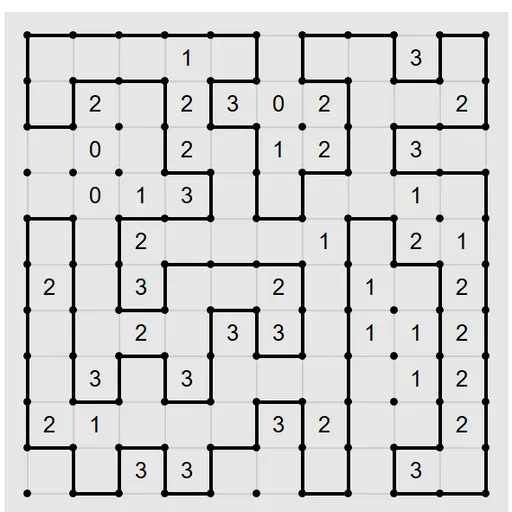
Loopy Loop Puzzle is a line-drawing logic game. You connect dots with lines to form one closed loop, and numbers in the cells say how many of each cell’s sides the loop uses. On a square grid it feels familiar. The surprise is that the same rules also run on triangles, hexagons and tilings that never repeat. Mike Pinna wrote it for Simon Tatham’s Portable Puzzle Collection, and Lambros Lambrou added the unusual grids.
What Counts as a Solved Loop
Your drawing must be one single ring. It can’t cross itself, split into a fork or break into two pieces. Every dot on the loop has exactly two loop lines, and every other dot has none. Each numbered cell must have the stated count of its sides on the ring. When it all fits, the board flashes.
Drawing and Ruling Out Lines
Every possible line begins yellow. Click it to make it black and part of the loop. Right-click, or press and hold on touch, to rule it out so it fades. Click again to put a line back to yellow.
Ruling lines out matters as much as drawing them. A board full of crossed-off lines makes the remaining choices clear.
How to Control Loopy Loop Puzzle
| To do this | On a keyboard | With a mouse | On a touchscreen |
|---|---|---|---|
| Add a line to the loop (repeat to clear it) | — | Left-click that line | Tap that line |
| Mark a line as excluded (repeat to clear it) | — | Right-click that line | Long-press that line |
| New puzzle, undo, redo | N, U, R | Use the menu buttons above the grid | Use the menu buttons above the grid |
Grids to Explore
Squares are only the start. Open the Type menu and you’ll see plain square boards in two sizes, then a long list of odd shapes: triangles, Cairo pentagons, kites, two kinds of Penrose tiles and more. The More submenu holds even stranger ones, such as hats and spectres. Each shape changes how many sides a cell has, so a 3 means something new on every grid.
Reasoning Tricks
- Start where the count is zero. Cross off every side of that cell before you do anything else.
- Look for neighbors with high clues. When two big numbers touch, the edge they share is often forced onto the loop.
- Count lines at each dot. Two drawn lines fill a dot. One drawn line means the path must leave by one of the others.
- Watch for tiny rings. Closing a short ring ends the puzzle wrong unless it really is the answer.
- Squeeze the corners. A high clue tucked into a board corner has few ways to place its sides.
Who It’s For
It suits players who like slow, careful logic with no timer. Small square boards take a few minutes. Large Penrose boards can fill an evening. If you like loop rules, try Pearl Loop Puzzle, which draws through cell centers instead of along edges.
Device Notes
Drawing is done by clicking or tapping lines, so a mouse is the most precise tool. On phones, the larger square grids are easiest to hit. Keyboard keys cover new game, undo and redo, and you also get restart and a Solve option.
Last played and checked by SZ Games: