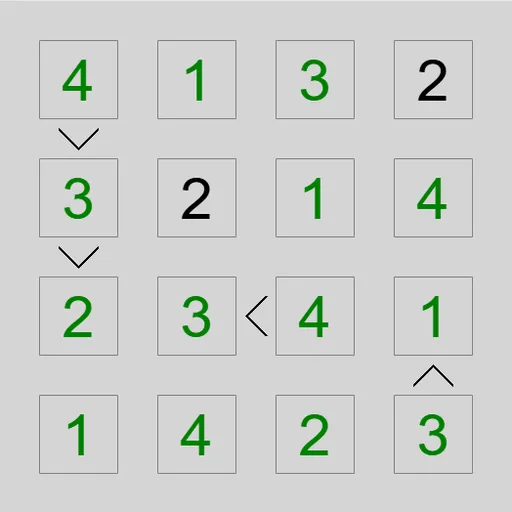
Greater-Than Grid is a number puzzle where tiny signs between the squares carry most of the clues. You fill the grid so that no digit repeats in any row or column. At the same time, every sign between two squares must point the right way. The puzzle is called Unequal in Simon Tatham’s Portable Puzzle Collection, and James Harvey wrote it. It also comes with a second rule set called Adjacent.
The basic rules
A grid that is N squares wide uses the digits 1 through N. Each digit shows up once in every row and once in every column. On a 6x6 grid, for example, each row holds 1, 2, 3, 4, 5 and 6 in some order.
In the standard mode, a sign between two squares works like the math symbol. The wide side faces the larger digit, and the point faces the smaller one. Some puzzles also start with a few digits already placed. On harder levels, fewer signs are shown, so you get less help.
The Adjacent twist
Switch to Adjacent mode and the signs become bars. A bar means the two digits next to it are one apart, like 4 and 5. Since every bar is drawn, a missing bar is a clue too. It tells you the two squares are not consecutive.
How to Control Greater-Than Grid
| To do this | On a keyboard | With a mouse | On a touchscreen |
|---|---|---|---|
| Fill in a digit | Move with Arrow keys, then type the digit | Click a square, then type a digit | Tap a square, then press a digit button |
| Toggle a pencil mark | Press Enter to put the cursor in pencil mode, then type a digit | Right-click a square, then type a digit | Switch Tap to Pencil mark (or long-press a square), then tap a digit |
| Empty a square | Space, Backspace or 0 | — | Tap the square, then press Clear |
| Add all candidate pencil marks / also strip the obvious ones | M / H | — | — |
| Dim a clue sign you are done with | Shift or Ctrl + the arrow key beside the clue | Click that sign | Tap that sign |
| New puzzle, undo, redo | N, U, R | Use the menu buttons above the grid | Use the menu buttons above the grid |
Filling the grid
Pick a square and type a digit, or use the on-screen buttons on a touch screen. If you are not sure yet, add small pencil marks instead. Two keys help here: M fills in every possible mark, and H does the same but also clears the obvious clashes. You can grey out a sign once you are done with it.
Deduction tips
- Use the extremes. A square on the small end of a sign can never be N. A square on the big end can never be 1.
- Follow chains. When three squares climb in a row of signs, the first is at most N minus 2 and the last is at least 3.
- Find the valleys. A square that is smaller than all its neighbors is often a 1 or 2.
- Read the gaps in Adjacent mode. A 1 with no bars around it means no neighbor can be 2.
- Grey out used signs. This keeps your eyes on the clues that still matter.
More to try
Undo, redo and a Solve button are always on hand. If you like digit logic, try Math Cage Grid or Skyscraper Sightlines next.
Last played and checked by SZ Games: