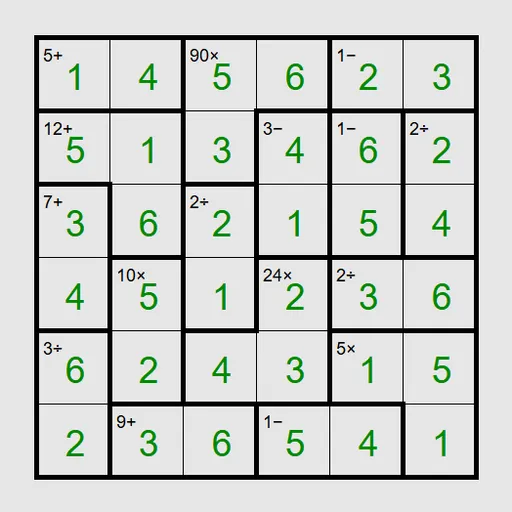
Math Cage Grid combines a no-repeat number grid with quick mental math. Thick lines split the board into cages. Each cage shows a target and an operation, like 12× or 7+. You fill every cell so each cage reaches its target and no row or column has a repeat. This is Keen from Simon Tatham’s Portable Puzzle Collection, and each board has exactly one answer.
The Two Layers of Rules
First, the grid rule. On a board of size n, every row and every column holds 1 to n once each.
Second, the cage rule:
- Plus cages must add to the target.
- Times cages must multiply to it.
- Minus and divide cages cover just two cells, and the bigger digit minus or divided by the smaller gives the target.
- One-cell cages simply give you the digit.
When all cages and lines check out, the board flashes.
Entering Numbers
Click a cell and type a digit. To keep notes, right-click the cell first and type pencil marks. Press M to fill every cell with all possible marks at once, then trim them down.
How to Control Math Cage Grid
| To do this | On a keyboard | With a mouse | On a touchscreen |
|---|---|---|---|
| Fill in a digit | Move with Arrow keys, then type the digit | Click a square, then type a digit | Tap a square, then press a digit button |
| Toggle a pencil mark | Press Enter to put the cursor in pencil mode, then type a digit | Right-click a square, then type a digit | Switch Tap to Pencil mark (or long-press a square), then tap a digit |
| Empty a square | Space, Backspace or 0 | — | Tap the square, then press Clear |
| Put every pencil mark into all empty squares | M | — | — |
| New puzzle, undo, redo | N, U, R | Use the menu buttons above the grid | Use the menu buttons above the grid |
Levels and Options
Ten presets cover sizes from 4x4 to 9x9 and difficulty from Easy to Unreasonable. Custom lets you pick any size from 3 to 9. There’s also a multiplication-only option that turns every cage into a product clue, which leans hard on factoring.
Solving Tips
- Grab the free cells. One-cell cages are given digits.
- Know the tight pairs. On 6x6, 11+ is only 5 and 6, and 3+ is only 1 and 2. A 5- cage must be 1 and 6.
- Factor large products. Break a big target into its prime factors to see which digits can fit.
- Use row totals. On 6x6 every row adds to 21. If whole cages cover all but one cell, subtract to find it.
- Check divide clues. A 2÷ cage on 6x6 can only be 1 and 2, 2 and 4, or 3 and 6.
Who It Suits
This is great if you like number puzzles and want a bit more than a plain grid. Small boards take a few minutes. If you enjoy the counting side, try Magnet Dominoes or a faster brain workout in Math Sprint Game.
Playing Without a Keyboard
On a phone or tablet, tap a cell, then tap a digit button under the grid. Switch the button mode to Pencil mark for notes. Clear empties the selected cell. Undo, redo and Solve are always there.
Last played and checked by SZ Games: