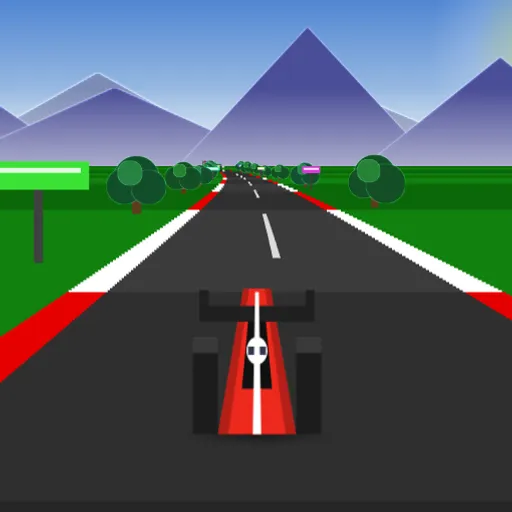
Speedway Sprint is a short, sharp racing game. You drive a red open-wheel car seen from just behind, on a looping track shared with a dozen slower cars. The clock gives you one minute, and your score is the road you cover in that time. It is part of Frank Force’s open-source LittleJS Arcade, with every car, tree and mountain drawn in code.
How a Run Works
Press Play and you start from a standstill. Hold the gas to climb toward the top speed of 230 mph. The timer only runs while you move, and when it hits zero, a Time Up screen shows your score. One more press starts a new run.
The twelve rival cars always move slower than your top speed, so you will be passing all the time. Rear-ending one costs close to half your speed and shoves you sideways. The grass beside the road slows you to a crawl and lowers your point rate. Curves also push the car toward the outside, so you need to steer into them.
How to Control Speedway Sprint
| To do this | On a keyboard | With a mouse | On a touchscreen |
|---|---|---|---|
| Speed up | Up arrow or W | Keep the left button held | Keep the lower button on the right held |
| Slow down | Down arrow or S | Keep the right button held | Keep the upper button on the right held |
| Turn the car | Left and right arrows, or A and D | Move the pointer to the left or right of screen center | Push the on-screen stick to the left or right |
| Open the pause menu | Press Escape | Click the menu icon in the top corner | Tap the menu icon in the top corner |
| Race once more after the clock runs out | Enter or Space | Click anywhere on screen | — |
Driving Clean
- Start turning a little before each bend. The car drifts for a moment after you release the stick or key.
- If you end up on the grass, keep the gas held. You keep a slow pace and can steer back. Letting go brings you to a stop.
- Pass with room to spare. Rival cars sway inside their lane.
- Use the long straight after the S-bends to get back to full speed.
- On desktop, choose either mouse or keys. Moving the mouse gives it control, and a key press hands control back.
Ways to Play
You can drive with a keyboard, a mouse, a touch screen or a gamepad. On touch devices, a stick and two buttons appear on screen. A pause menu lets you resume, restart or go back to the title.
The scenery shifts as you take each curve, with the sun and mountains sliding across the sky. Runs are quick, which makes it easy to try “just one more” to beat your last score. For another style of racing, try Tiny Track Racer, or see all racing games.
Last played and checked by SZ Games: