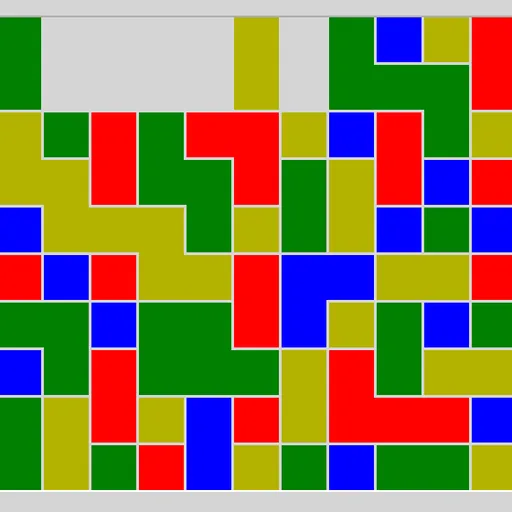
Same Game Blocks gives you a box packed with colored squares and one job: empty it. You may only remove a group of two or more squares of one color that touch along their sides. Whatever was above falls down, and empty columns slide together. The scoring rewards big groups far more than small ones, so patience pays. James Harvey wrote this puzzle for Simon Tatham’s Portable Puzzle Collection.
Picking and Removing Groups
Click any square and its full linked group lights up. The status bar tells you how many squares are in it and what it would score. Click the same group again to clear it. If you change your mind, pick a different group, or right-click to cancel. On touch screens, press and hold to cancel.
After a group goes, squares above it drop straight down. When a whole column is empty, the columns on its right shift left to close the gap. A single square with no same-colored neighbor can never be removed by itself.
How to Control Same Game Blocks
| To do this | On a keyboard | With a mouse | On a touchscreen |
|---|---|---|---|
| Highlight a group | Move the cursor with the arrow keys, then press Space or Enter | Left-click any square of the group | Tap any square of the group |
| Clear the highlighted group | Press Space or Enter a second time | Left-click the highlighted group once more | Tap the highlighted group once more |
| Deselect the group | — | Right-click the highlighted group | Press and hold the highlighted group |
| Undo, redo or start a new board | U / R / N | The Undo move, Redo move and New game buttons | The Undo move, Redo move and New game buttons |
Winning and Losing
Clear every square and the status bar shows COMPLETE with your final score. If only lone squares are left and none of them touch a match, the bar reads “Cannot move” and the game is over. You can undo back from there and try a new path.
Planning Ahead
- Merge before you clear. Remove other colors from between scattered squares of one color so they fall into one large group.
- Start low. Clearing near the bottom moves more of the board, which often joins pieces that were apart.
- Protect the last few of a color. If one square ends up cut off from its color, you can no longer empty the board.
- Compare scores first. The preview shows the points before you commit, so check a few options.
- Use pairs to reshape. They score nothing under standard rules, but they are great for moving colors into place.
Who Will Like It
This suits anyone who enjoys slow, thoughtful puzzles with no rush. The small first board teaches the rules in a minute, and the large boards can take a long while to plan. It plays well with a mouse, keyboard or finger, so it works on phones too.
For more calm logic puzzles from the same collection, try Flood Fill Puzzle, or visit our puzzle games on SZ Games.
Last played and checked by SZ Games: