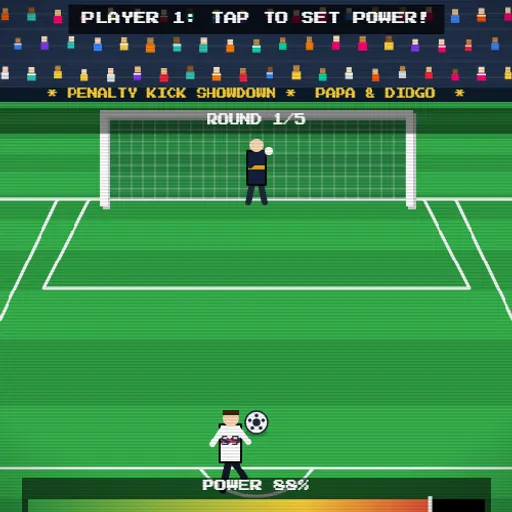
Penalty Kick Showdown boils a soccer match down to its tensest moment: the spot kick. Two sides each take five penalties, and you play both roles, shooting on one kick and guarding the net on the next. The art is chunky pixel style with a noisy crowd and chiptune music. A father and son made it as their first game, under the name PaDi Shooter 89.
Setting Up a Match
Type in up to two player names and choose a team for each side. You can go with a national team or one of the made-up clubs, and the shirts take on that team’s colors. Playing alone? Pick Easy, Normal or Hard for the computer. Playing with a friend? Choose 2 Players and share one device.
Taking a Shot
The goal is split into nine zones, three across and three high. Tap the zone you want. Next, a power bar sweeps from 1 to 100 percent. Tap again, or press Space, to stop it and strike. A stronger kick travels faster, which makes a near-miss dive less likely to stop it.
Playing in Goal
When the other side shoots, you choose a dive zone first. If the ball heads into the exact zone you picked, it is saved, every time. A dive one zone off can still get a hand on it, but the odds of that fall as the shot gets harder.
Winning the Shoot-Out
After five rounds, the side with more goals wins. If it is level, the game goes to sudden death. Each side kicks once per round until one is ahead after the same number of attempts. Results then go onto a leaderboard in your browser.
How to Control Penalty Kick Showdown
| To do this | On a keyboard | With a mouse | On a touchscreen |
|---|---|---|---|
| Choose where to shoot or dive | — | Click any of the nine zones of the goal | Tap one of the goal zones |
| Stop the power bar and kick | Press Space or Enter | Click anywhere on screen | Tap anywhere on screen |
| Move on after a goal, save or miss | Press Space or Enter | Click the screen | Tap the screen |
| Toggle sound | Press M | Click the note button in the top right | Tap the note button in the top right |
| Quit the match | — | Click Menu in the top left | Tap Menu in the top left |
Tips From the Penalty Spot
- Always max the bar. Since power cannot cause a miss, there is no reason to hold back.
- Pick your risk. Top corners are harder to save but miss more often. The middle row is the safe choice.
- Go high on the CPU. The computer keeper dives to the top row less often than to the lower rows.
- Hide your dive in two-player games. The keeper locks in first, so the shooter should look away while you tap.
- Mix it up. Against a friend, repeating the same corner is the quickest way to get read.
Sound and Devices
Music, whistles and crowd noise begin after your first tap, and M or the note button mutes them. It plays well on a phone held sideways. For more ball games, try Free Throw Frenzy or the full list of sports games.
Last played and checked by SZ Games: