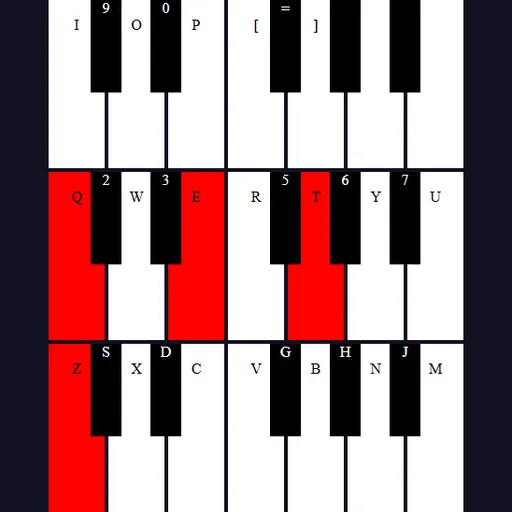
Tiny Synth Piano is a little instrument that runs in your browser. It has 36 keys stacked in three rows, one octave per row, with the lowest notes at the bottom. There are no recorded samples. Each note is built on the spot by the browser, so sound starts the moment you press a key. Frank Force first wrote it as 1Keys, a piano in about one kilobyte of code, and this enhanced version adds labels and extra controls.
Playing Notes
There is no goal or score. You just play. Press a letter key and the matching piano key turns red while the note sounds. Let go and the note fades out quickly, then the key color returns to normal.
The bottom letter row of your keyboard plays the lowest octave, starting with Z as a low C. Keys just above, like S and D, give you the black notes. The Q row with the number keys above it plays the middle octave in the same pattern. The top octave continues on I, O, P and the bracket keys. You can also click keys or sweep across them with the mouse.
How to Control Tiny Synth Piano
| To do this | On a keyboard | With a mouse | On a touchscreen |
|---|---|---|---|
| Play the bottom octave | Z S X D C V G B H N J M | — | — |
| Play the middle octave | Q 2 W 3 E R 5 T 6 Y 7 U | — | — |
| Play the highest octave | I 9 O 0 P [ = ] | — | — |
| Sound or sustain any key | — | Press and hold a key, or sweep across keys with the button held | Touch a key and keep holding |
| Adjust voice, wave shape, octave or key | — | Click the voice buttons, the Shape menu, or the Octave and Key arrows | Tap those same controls |
Shaping the Sound
Small buttons at the top pick the voice. The piano icon is an organ sound and is on by default. Others give brass, strings or a single plain tone.
The Shape menu changes the wave behind every voice: sine, square, sawtooth or triangle. Sine is soft, while square and sawtooth sound buzzy. Octave shifts the whole keyboard up or down, and Key moves it by half steps, up to twelve.
Ideas to Try
- Play one note with each wave shape to hear the difference.
- Use the comma, L, period, semicolon and slash keys, which repeat the first middle notes, for quick runs.
- Change Key to play a tune you know in a new key with the same fingers.
- Lower the octave for a deep bass line.
- Hold the mouse button and glide across the keys for a fast scale.
A Relaxing Break
It makes a nice two-minute break between tasks, and it can help kids find simple tunes. For other calm toys, look through the casual games, or make art in Pixel Sketch Studio.
Last played and checked by SZ Games: