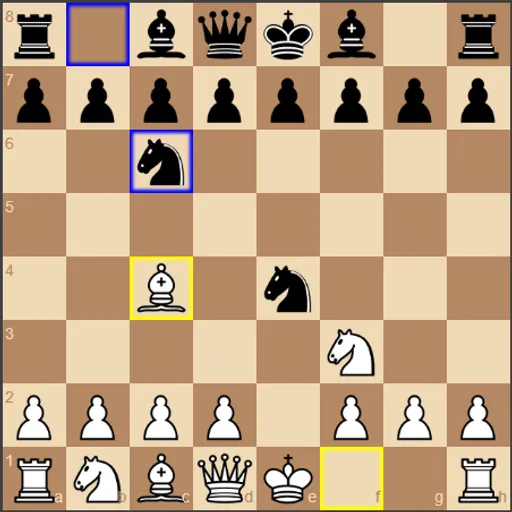
Chess vs Computer gives you the white pieces against a compact JavaScript chess engine. You move, the engine thinks, and Black replies. The aim is the classic one: checkmate the other king. What makes this version handy for learning is how much it shows you. After every reply you can see how many positions the engine checked, how long it took and which side it thinks is ahead.
Making Your Moves
Every standard rule is in place, including castling and en passant. Drag a piece to a legal square and drop it. An illegal move snaps back. With a mouse, hover over a piece and its legal squares are shaded gray.
Your last move gets a yellow outline and Black’s reply a blue one, so you can follow the game at a glance.
How the Engine Thinks
The computer uses a minimax search with alpha-beta pruning. It scores positions by piece values and by tables that rate each square for each piece. Search depth, set in Settings from 1 to 5, decides how far ahead it looks. Deeper searches play better but take longer, and the page waits while it thinks.
Reading the Screen
- Advantage bar: shifts left or right as material and placement change.
- Status line: tells you about check, and how the game ended: checkmate, stalemate, threefold repetition, the 50-move rule or too little material to mate.
- Search stats: positions evaluated, thinking time and positions per second.
How to Control Chess vs Computer
| To do this | With a mouse | On a touchscreen |
|---|---|---|
| Pick up and place a piece | Hold and drag it onto the target square | Hold and drag it onto the target square |
| See legal moves ahead of time | Rest the pointer on one of your pieces | — |
| Undo your previous move plus the reply | Hit "Undo" | Tap "Undo" on screen |
| Redo moves you undid | Hit "Redo" | Tap "Redo" on screen |
| Adjust engine depth or enable hints | Open "Settings", then choose a value or check the box | Open "Settings", then choose a value or check the box |
| Load an opening or start over | Open "Opening Positions" and pick a button | Open "Opening Positions" and tap one of the buttons |
Getting Better With It
- Climb slowly. Win at depth 2 a few times before moving to 4 or 5.
- Watch for score jumps. If the Advantage number swings after your move, you may have left a piece loose.
- Use hints wisely. Tick “Show Suggested Move (White)” and a red outline marks the engine’s pick for you. Decide if you agree before playing it.
- Study openings. Load a set line and practice the middle game that follows.
- Undo to compare. It removes your move and the reply, so you can test another idea.
- Think before promoting. An automatic queen can create a stalemate by accident.
Devices and Who It Suits
This fits casual players who want a patient opponent and learners who like seeing the numbers. Touch dragging works, but on a narrow screen the menus stack above the board, so you may need to scroll. For a lighter board game, try Checkers or see the card and board games.
Last played and checked by SZ Games: