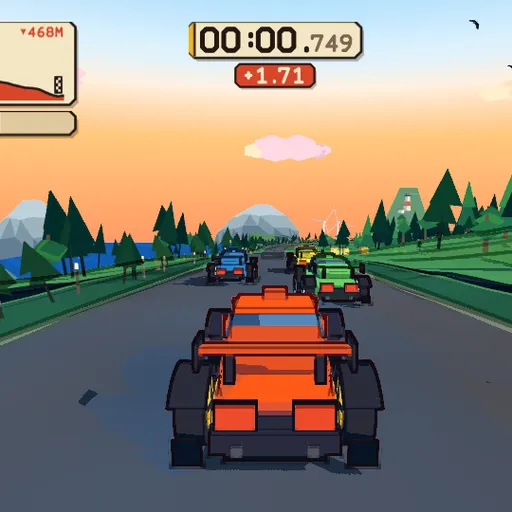
Red Rock Descent is a single downhill run on a twisting road above the sea. You and three computer drivers roll off a line at the top of the mountain, and the first car to reach the bottom wins. The look is bold and comic-like, with thick black edges and flat bands of shade. Even the cars, trees, crowd and music are built by code when the page opens.
The Race at a Glance
The title card lists the stage length, the total drop and a course seed. Press Enter, sit through the short count, and the lights go out. The clock only starts then. If you have seen the countdown before, Enter skips it.
Along the way you pass forest, wind turbines, open water and fans by the road. A few ramps lift the car into the air, so expect to land and steer at once.
How to Control Red Rock Descent
| To do this | On a keyboard | On a touchscreen |
|---|---|---|
| Hit the gas | Up arrow or W | Keep the on-screen throttle pedal held |
| Slow down | Down arrow or S | Keep the on-screen brake pedal held |
| Turn the car | Left and right arrows, or A and D | Tilt your device, or slide a thumb sideways |
| Pull the handbrake | Press Space | — |
| Check behind you | Keep C held | — |
| Begin the race or skip the countdown | Press Enter | — |
| Restart, or free a stuck car | Press R | — |
| Open the pause menu | Press Escape | — |
Reading the Screen
A card in the top left plots your spot on the height profile of the course. Under it, a strip marks the rivals. A badge shows your place, and a dial gives your speed in km/h.
Below the timer sits a red number. While you trail, it shows the gap in seconds to the car just ahead, with a plus sign. Once you lead, it shows your margin over second place instead.
At the bottom, every car brakes to a stop and a results card lists drivers, times and gaps. Press R or use the pause menu to try again.
Driving Advice
- Slow down on the straight. Braking moves the car’s weight forward, so do it before you turn in, then ease off.
- Stay off the loose edge. The tires lose about a quarter of their grip there, which ruins the next corner too.
- Tap the handbrake. A short press of Space swings the tail around a hairpin. Holding it bleeds speed.
- Watch the gap number. If it keeps shrinking, your lines are working.
- Pass one car at a time. You have 5.6 km. Forcing moves early mostly ends in the barrier.
- Press R when stuck. It also rescues a car that has left the road.
Device Notes
The game runs best on a laptop or desktop with a keyboard or gamepad. On phones there are throttle and brake pedals, and you steer by tilting or dragging a thumb. Hold the phone sideways first. The 3D scene is heavy, so older phones may stutter.
If you want a lighter race, try Tiny Track Racer or browse all racing games on SZ Games.
Last played and checked by SZ Games: