In Pocket Pool you have a full table to yourself and one job: sink all fifteen numbered balls using as few strokes as you can. Nobody takes turns with you, and no ball has to go down in a set order. The score that counts is your own lowest total. Frank Force made the game with his LittleJS engine, and a Box2D physics layer moves every ball, so the rack spreads and rebounds in a way that feels real.
The Goal at a Glance
Each rack starts with the balls packed at the foot of the table and the cue ball waiting behind the head string. Three counters sit at the top of the screen. One shows strokes taken, one shows your best cleared rack, and one shows balls left. When the last counter hits zero, the table is clear and your stroke total is checked against your record.
Taking a Shot
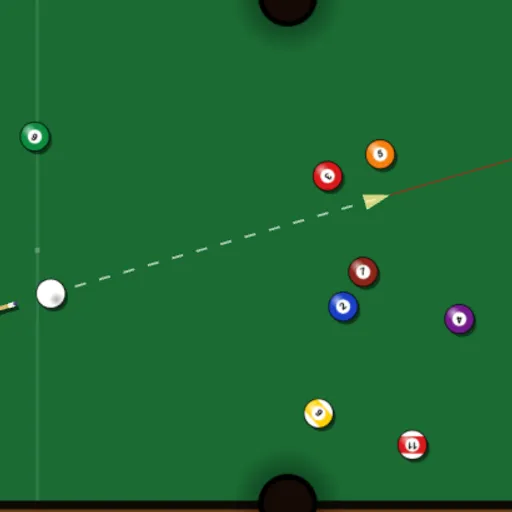
Point to aim. The farther your pointer is from the cue ball, the harder the hit will be. A dotted line and an arrow preview the stroke, and a power percentage sits at the bottom. On a phone you pull back from the cue ball and release, much like a slingshot.
A thin red line extends straight ahead from the arrow. Treat it as a sight only. It will not bend off cushions or other balls, so you still read the angles with your own eye. Once the balls are rolling you can hold the right mouse button to speed things up.
Drop the cue ball and you get a scratch. Wait for the table to settle, then set the white anywhere open on the felt.
How to Control Pocket Pool
| To do this | On a keyboard | With a mouse | On a touchscreen |
|---|---|---|---|
| Line up the shot and choose power | — | Point where you want the cue ball to travel; the farther from the ball, the harder the shot | Press and drag behind the cue ball; pull back farther for a harder shot |
| Take the shot | — | Click the left button | Raise your finger |
| Adjust power precisely | — | Roll the wheel (up for more power, down for less) | — |
| Speed up moving balls | — | Keep the right button held | — |
| Reposition the cue ball after a scratch | — | Move to a spot, then click | Drag to a spot, then raise your finger |
| Rack up a new game | Press R | Open the menu icon, then choose New Rack | Open the menu icon, then choose New Rack |
| Pause play | Press Esc | Click the menu icon at the top right | Tap the menu icon at the top right |
Ways to Save Strokes
- Break at full power. A strong opening scatters the pack and often pots a ball for free.
- Tap softly on balls that hang in a pocket mouth. A light touch keeps the cue ball from following them in.
- Look one shot ahead. Balls slow down quickly near the end of a roll, so picture where the white will stop.
- Treat ball in hand as a gift. After a scratch, place the white for the easiest straight pot on the table.
- Use the mouse wheel to nudge power up or down when a shot needs a precise speed.
Who Will Enjoy It
This one suits anyone who likes calm, careful play with a clear target to beat. A rack takes only a few minutes, and your best count stays in the browser, so you can come back later and try to shave off one more stroke. If you want other relaxed ball games, browse the sports games or try a round of Mini Putt Park.
The table also works well on touch screens, since the slingshot controls need only one finger. Press R at any time to rack up a fresh game.
Last played and checked by SZ Games: