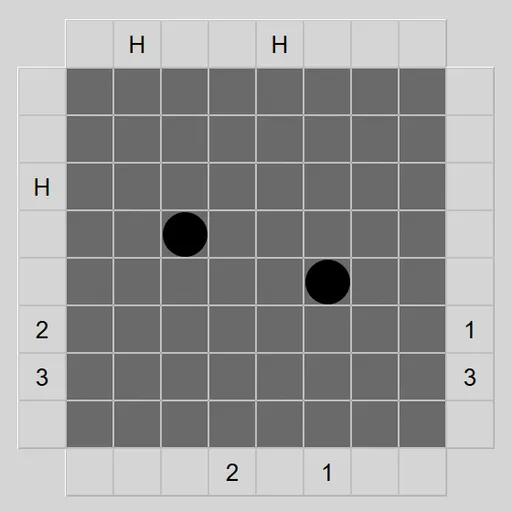
Black Box Lasers is a deduction puzzle about things you cannot see. A few balls sit somewhere inside a dark grid. Your only tool is a laser you can shoot in from the edge. Every beam reports back in its own way, and you piece those reports together until you know where each ball must be. James Harvey wrote this version for Simon Tatham’s Portable Puzzle Collection, based on a 1977 board game by Eric Solomon.
The Puzzle in Brief
The default box is 8x8 with five hidden balls. Mark where you think they are, then ask the game to check. A good solve uses as few beams as possible, since every shot gives away information.
What a Beam Can Do
Click a light square on the border and a beam enters in a straight line. Then one of four things happens:
- Absorbed. A ball is dead ahead, so the beam stops. The edge square shows H.
- Turned. A ball sits diagonally in front on one side, so the beam bends 90 degrees away from it.
- Reflected. The beam comes back out of the square it entered, or turns away right at the entrance. You see R.
- Passed through. It exits somewhere else, and a matching number appears at both ends.
A beam can turn more than once before it leaves, so its route is not always obvious.
Marking and Checking
Click inside the box to place or remove a guess. When your count matches the number of hidden balls, a button appears in the top left corner. Press it to test your layout. Solve reveals the answer and marks which guesses were right.
How to Control Black Box Lasers
| To do this | On a keyboard | With a mouse | On a touchscreen |
|---|---|---|---|
| Shoot a laser | Move with Arrow keys to an edge square, then press Enter | Left-click any edge square | Tap any edge square |
| Add or clear a ball guess | Move with Arrow keys inside the box, then press Enter | Left-click a spot inside the box | Tap a spot inside the box |
| Lock a square, row or column | Press Space | Right-click a square, or an edge square to cover its entire row or column | Long-press it |
| Submit your guesses | Navigate to the top-left corner button, then press Enter | Hit the button that shows up in the top-left corner | Tap the button that shows up in the top-left corner |
| Undo, redo or start a new box | Press U / R / N | Use the Undo move, Redo move and New game buttons | Use the Undo move, Redo move and New game buttons |
Reasoning Tips
- Open with center lines. A shot through the middle quickly shows whether balls are near the core.
- Trace every H. The ball is somewhere along that beam’s route, possibly after a turn.
- Treat R with care. It can mean a ball next to the entry, or a beam that looped back.
- Double-check straight exits. A clean pass often means an empty lane, but two turns can cancel out.
- Lock cleared areas. It keeps your board tidy as the picture fills in.
Who Will Like It
If you enjoy slow, careful logic with no timer, this one fits. Undo is unlimited, and you can play with mouse, keyboard or touch. For another hidden-object logic puzzle, try Logic Mines, or browse all puzzle games.
Last played and checked by SZ Games: