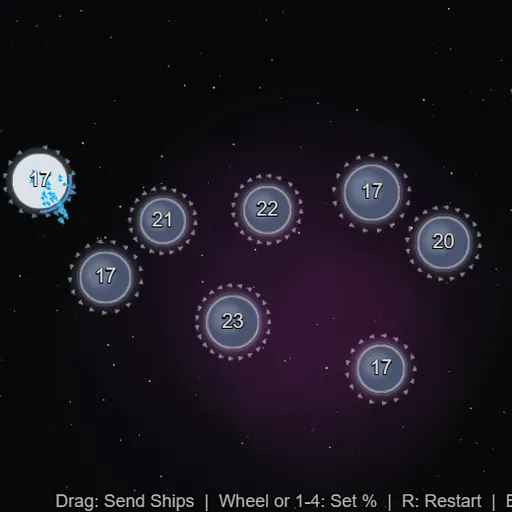
OrbitSwarm is a fast real-time strategy game on a single screen full of planets. You start with one blue home world, the computer starts with one red world, and gray neutral planets fill the space between. Drag from a planet you own to send out a stream of tiny ships. Every planet you hold keeps building more, so each capture makes you stronger. OrbitSwarm is part of Frank Force’s open-source LittleJS Arcade, and most matches take a few minutes.
Winning and Losing
Take every red planet to win. The game then shows your time. If your last planet falls, you lose.
A Match from Start to Finish
Choose EASY, MEDIUM or HARD on the title screen. Your home world has a blue ring and a number showing the ships parked there. Neutral planets also show their defenders, but they don’t grow until someone owns them.
Drag from one of your planets to a target. Ships stream out and arrive one by one. Sending ships to your own planet adds to its count, which is how you move forces toward the front.
How to Control OrbitSwarm
| To do this | On a keyboard | With a mouse | On a touchscreen |
|---|---|---|---|
| Dispatch a fleet | — | Press on one of your planets, drag onto a target and let go | Drag from one of your planets onto a target |
| Choose what portion of ships to send | 1 = 10%, 2 = 25%, 3 = 50%, 4 = 100% | Roll the wheel during the drag | — |
| Start the match over | R | — | — |
| Pause the game | Esc | — | — |
Production and Limits
Bigger planets build ships faster and hold more of them. A ring around each of your planets shows how full it is. At the limit, building stops. The rival follows the same rules, so it grows as it spreads.
Strategy Tips
- Take close, cheap neutrals. Small nearby planets start paying back at once.
- Send extra. Targets keep building while your ships fly, so an exact count may fall short.
- Keep ships moving. A full planet wastes production. Push the surplus forward.
- Strike after it attacks. The rival often sends half or more of a planet’s ships, leaving it weak.
- Go easy on 100 percent sends. An empty planet is easy to lose.
Who It’s For
This suits players who like quick strategy without long setup. Matches are short, so you can try a new plan right away. There’s no sound, which makes it handy in a quiet room. For more planning games, see strategy games, or try Moon Lander for a slower space challenge.
Devices
Play with a mouse, keyboard or touch screen. On touch, drag from planet to planet just as you would with a mouse.
Last played and checked by SZ Games: