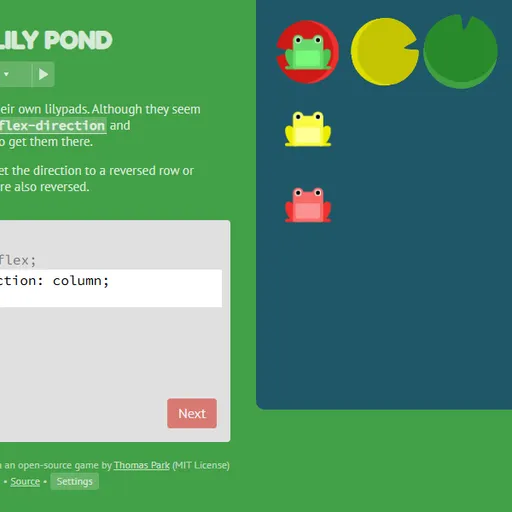
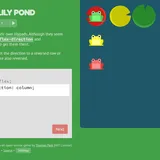
Flexbox Lily Pond is a friendly coding game that teaches CSS flexbox with frogs. Green, yellow and red frogs need to reach lily pads of the same color. You get them there by writing real CSS for the pond, the same kind you would use to lay out a web page. Every keystroke moves the frogs, so you see each property work.
Why Frogs Make Flexbox Click
Flexbox is about lining items up along a main axis and a cross axis. Those words feel abstract at first. Watching frogs slide left, right, up and down as you change a value makes the ideas concrete. You learn by trying, not by memorizing.
How a Level Works
The screen has three parts: a short lesson, a code box and the pond. The code box already sets display: flex; on the #pond container. You add the missing lines.
Your code applies as you type. When every frog sits on a pad of its color, the Next button lights up. Any valid CSS that gets there counts, so you can solve a level your own way. The code box only has as many lines as the level needs, and pressing Enter on the last line submits.
How to Control Flexbox Lily Pond
| To do this | On a keyboard | With a mouse | On a touchscreen |
|---|---|---|---|
| Write CSS | Type into the code box | — | Tap the code box to bring up the on-screen keyboard |
| Send in a correct answer | Press Enter on the final line, or Ctrl + Enter | Hit "Next" when it lights up | Tap "Next" on screen |
| Choose a level | — | Click the level counter and then a number, or use the arrows at the sides | Tap the level counter and then a number |
| Learn about a property | — | Click any highlighted property name in the instructions | Tap any highlighted property name |
| Adjust difficulty or colorblind mode | — | Hit "Settings" below the editor | Tap "Settings" on screen |
The Path Through 24 Levels
The lessons build step by step:
justify-contentmoves frogs along the row, andalign-itemsmoves them across it.flex-directionturns the row into a column or reverses it. That also flips where “start” and “end” are.orderandalign-selfmove a single frog.flex-wrapandflex-flowspread frogs over several lines.align-contentspaces those lines apart.
The final levels ask you to combine several of these at once.
Coding Tips
- Find the main axis first. In a column,
justify-contentmoves frogs up and down, not sideways. - Click highlighted words. Each one opens a list of the values that property accepts.
- Expect flips with reverse. With
row-reverse,flex-startsits on the right side. - Change one frog at a time. Levels about
orderandalign-selfgive you a rule for just one frog color. - Tell the aligns apart.
align-itemsmoves frogs inside each line, whilealign-contentmoves whole lines.
Who It Helps
This game suits new web developers, students and anyone who keeps looking up flexbox values. It works on phones, where the editor and pond stack, but a larger screen shows the whole pond while you type. When you finish, try grid layout in CSS Grid Carrot Patch.
Last played and checked by SZ Games: